
Watchlists with their own rules
Alert, block, VIP, staff, access and missing persons, each list with its own color, sound, threshold, cameras and schedule.
AI for cameras
Nexa VMS face recognition uses video analytics to compare the faces that pass the cameras against enrolled watchlists and alerts the operator when someone on a list appears. It works with the IP cameras you already have, through ONVIF or RTSP, and the analysis runs on the AI server, not on the camera.
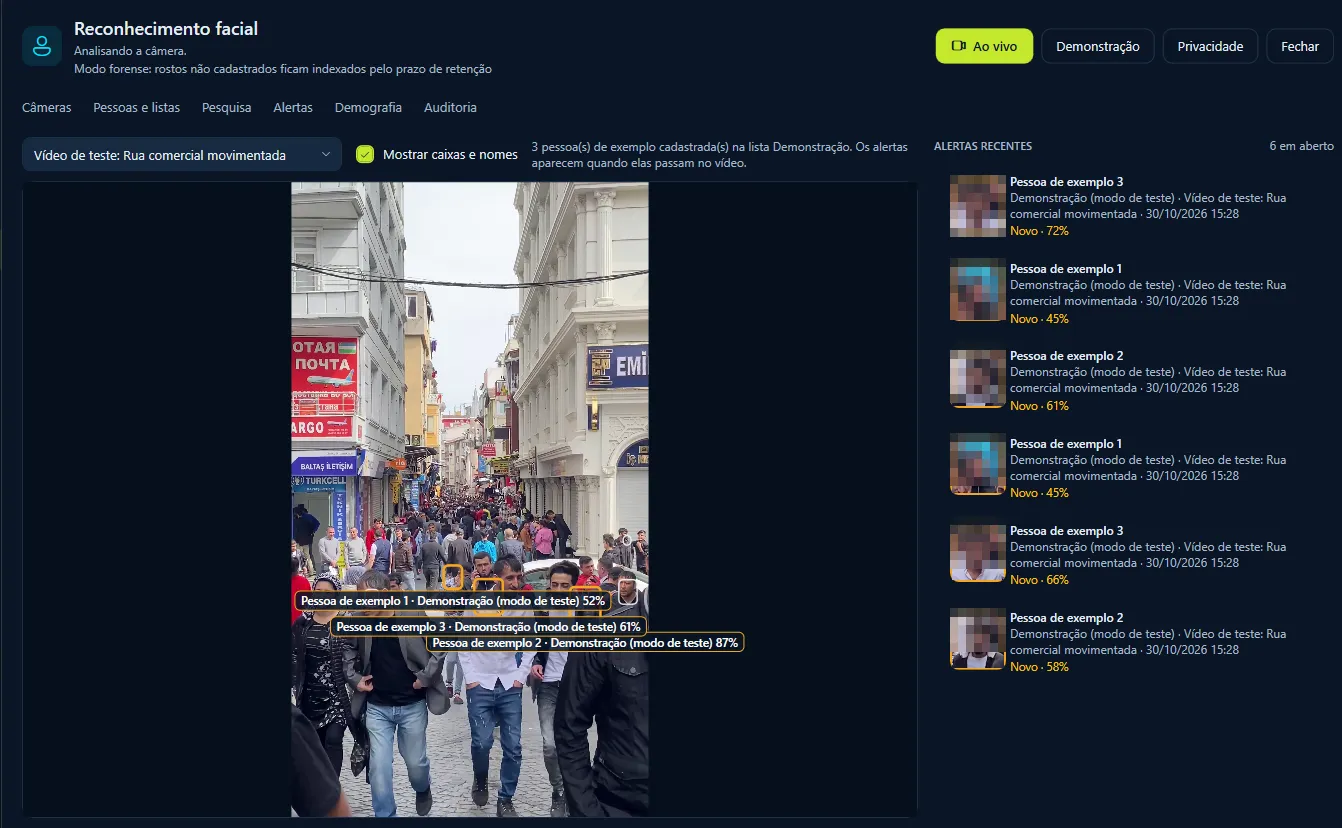
Alert, block, VIP, staff, access and missing persons, each list with its own color, sound, threshold, cameras and schedule.
The operator sees the enrolled photo next to the capture, with the similarity, camera and time, and confirms it or marks it as a false positive with a reason.
Find every appearance of a person across the chosen cameras and period, with a shortcut to the recorded video at the exact second.
Enroll from a file, from an alert or from a ZIP of photos with a spreadsheet. Small, blurred or profile photos are rejected.
Purpose and legal basis per camera, retention with automatic deletion, an audit trail of every access and exports with blurred faces.
Nexa VMS was designed for AI to follow every camera all the time, not just a few selected ones.
Nexa VMS was designed for AI to work on every camera, all the time, and bring the operator only what needs attention. It is not a VMS with AI on a few cameras.
How the AI VMS worksIt is the analysis of security camera video to detect faces and compare them with enrolled watchlists. When the similarity passes the list threshold, the system alerts the operator, who decides what to do.
It works with IP cameras through ONVIF or RTSP. The face has to appear large enough, about 40 pixels between the eyes, and facing the camera or slightly turned. Entrance and corridor cameras at head height give the best results.
Accuracy depends on camera position, lighting and face size in the image. Profile, very small or covered faces are not compared. Every alert goes through operator review, and rejections show the false positive rate of each list.
The default mode only keeps people who are on the lists. Purpose and legal basis are recorded per camera, data is encrypted, every access is audited and retention deletes data on schedule. Age and gender are off by default, and emotion and ethnicity do not exist in the product.
Pricing is negotiated per project and is competitive. You can download Nexa VMS and request a trial license to test face recognition on your cameras.
Download Nexa VMS, request a trial license and test the AI on your cameras or on recorded video. For larger projects, we provide an extended demo.
Pricing negotiated per project, competitive with the VMS on the market.
Company headquartered in the United States, with sales partners in other countries. Talk to the team: support@nexavms.io, reply within 24 hours.